Part 1: The Summit Awaits — Azure Fundamentals & Core Concepts
Marcus begins his Azure journey by understanding the platform's organizational model. We explore subscriptions, resource groups, regions, and the Azure Resource Manager. Learn how Azure's architecture differs from AWS and why these foundational concepts matter for your designs.
Part 1: The Summit Awaits — Azure Fundamentals & Core Concepts

Marcus Begins His Azure Journey
The First Day
Marcus sits at his desk on day one at CloudVault. His task is clear: build a fintech platform on Azure. But first, he needs to understand how Azure works.
“Azure is a cloud platform,” his manager explains. “But it’s organized differently than AWS. If you understand the organizational model, everything else makes sense.”
Marcus opens the Azure portal and sees a hierarchy he’s never encountered before: subscriptions, resource groups, regions, and resources. Each level serves a purpose.
“Let’s start at the top,” Marcus decides. “And work our way down.”
Understanding Azure’s Architecture
Azure operates as a global cloud platform with data centers in 60+ regions worldwide. Unlike AWS, which uses a region-based model with separate availability zones, Azure combines regions with availability zones for redundancy. Each region contains multiple data centers that work together to provide high availability and disaster recovery.
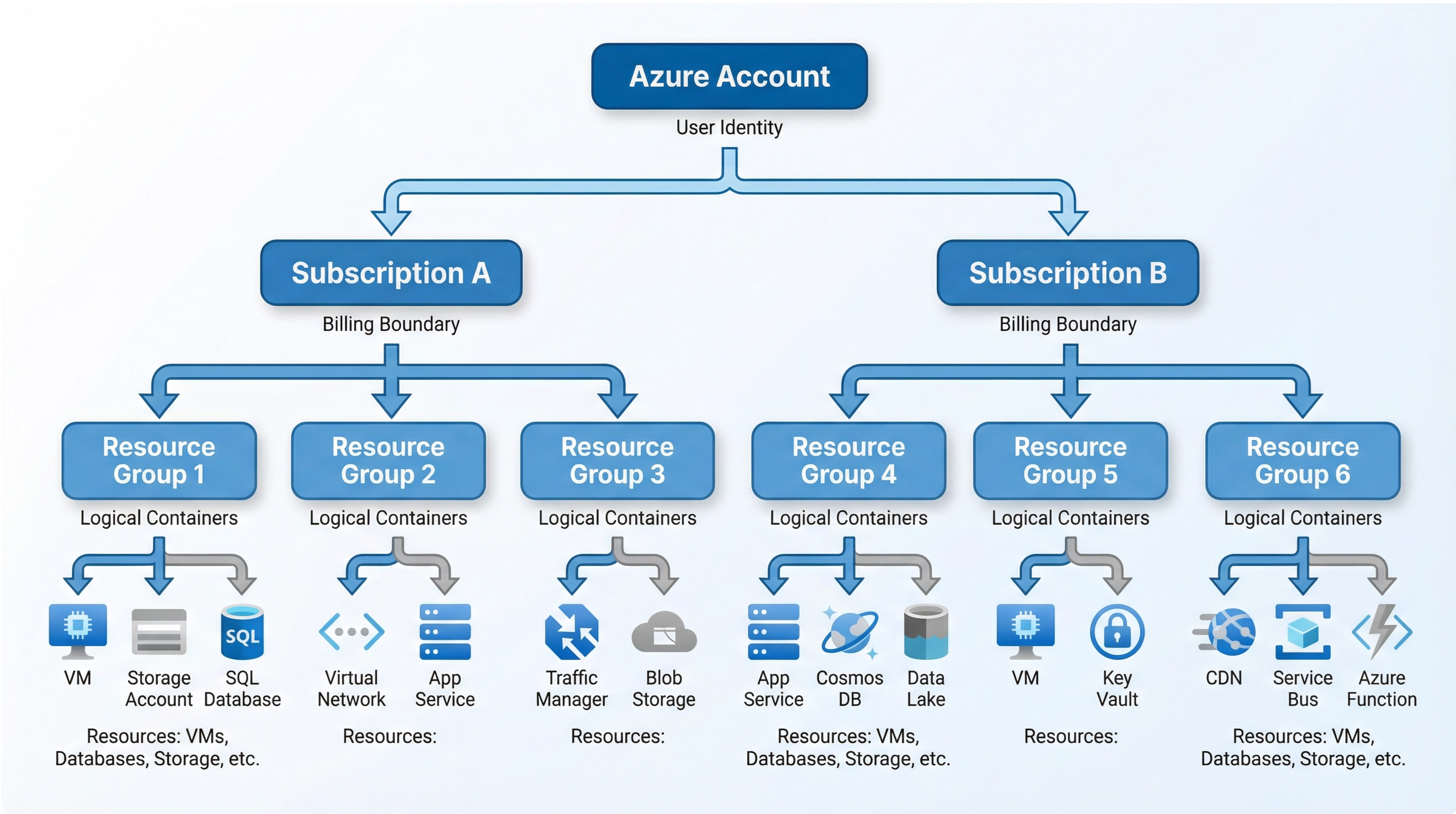
The fundamental organizational structure in Azure consists of three layers: subscriptions, resource groups, and individual resources. This hierarchy provides clear boundaries for billing, access control, and resource management.
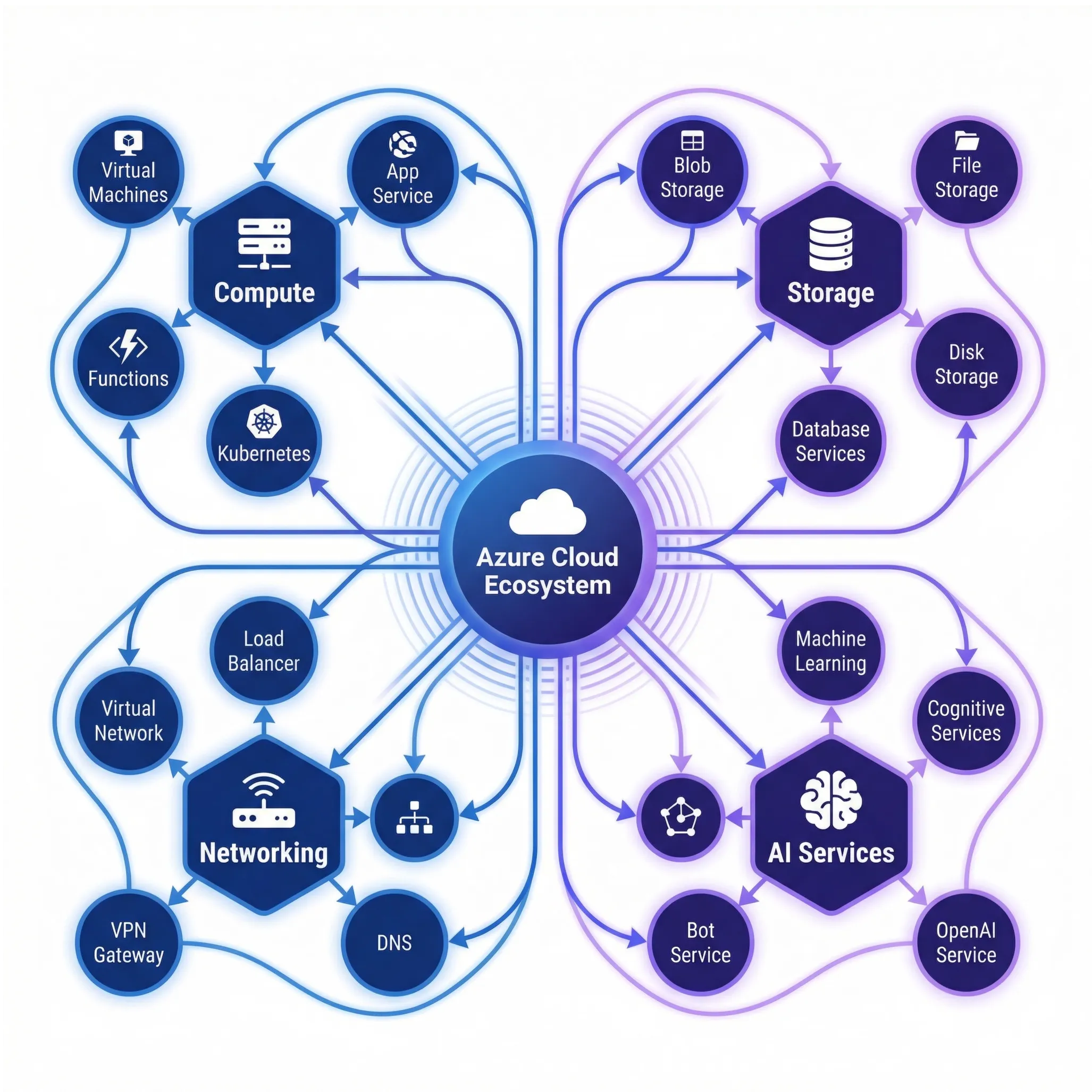
Azure’s Organizational Hierarchy
Azure organizes resources in a four-level hierarchy:
- Azure Account — Your identity
- Subscription — Billing boundary
- Resource Group — Logical container
- Resources — VMs, databases, storage, etc.
Subscriptions: Your Billing Boundary
A subscription in Azure is equivalent to an AWS account. It represents your billing boundary and access control unit. Each subscription is tied to an Azure account and contains all resources you create within that subscription. Organizations typically create multiple subscriptions to separate environments (development, staging, production), departments, or business units.
# List all subscriptionsaz account list --output table
# Set active subscriptionaz account set --subscription "My Subscription"
# Get subscription detailsaz account show
Key Points:
- Each subscription has its own billing
- Resources belong to exactly one subscription
- Access control (RBAC) is managed at subscription level
- You can have multiple subscriptions under one Azure account
Resource Groups: Logical Organization
Resource groups are logical containers that hold related resources for an Azure solution. Unlike AWS regions, resource groups are purely organizational units without geographic significance. All resources within a group can share lifecycle management, permissions, and billing tracking.
A best practice is to create resource groups that align with your application structure. For example, you might create separate resource groups for your web tier, API tier, and data tier, allowing you to manage permissions and costs independently.
# Create a resource groupaz group create \  --name rg-cloudvault-prod \  --location eastus
# List resources in a groupaz resource list --resource-group rg-cloudvault-prod --output table
# Delete a resource group (deletes all resources within it)az group delete --name rg-cloudvault-prod
Best Practices:
- One resource group per application or environment
- Use naming conventions:
rg-{app}-{env} - All resources in a group share the same lifecycle
- Easier to manage permissions and costs
Regions and Availability Zones
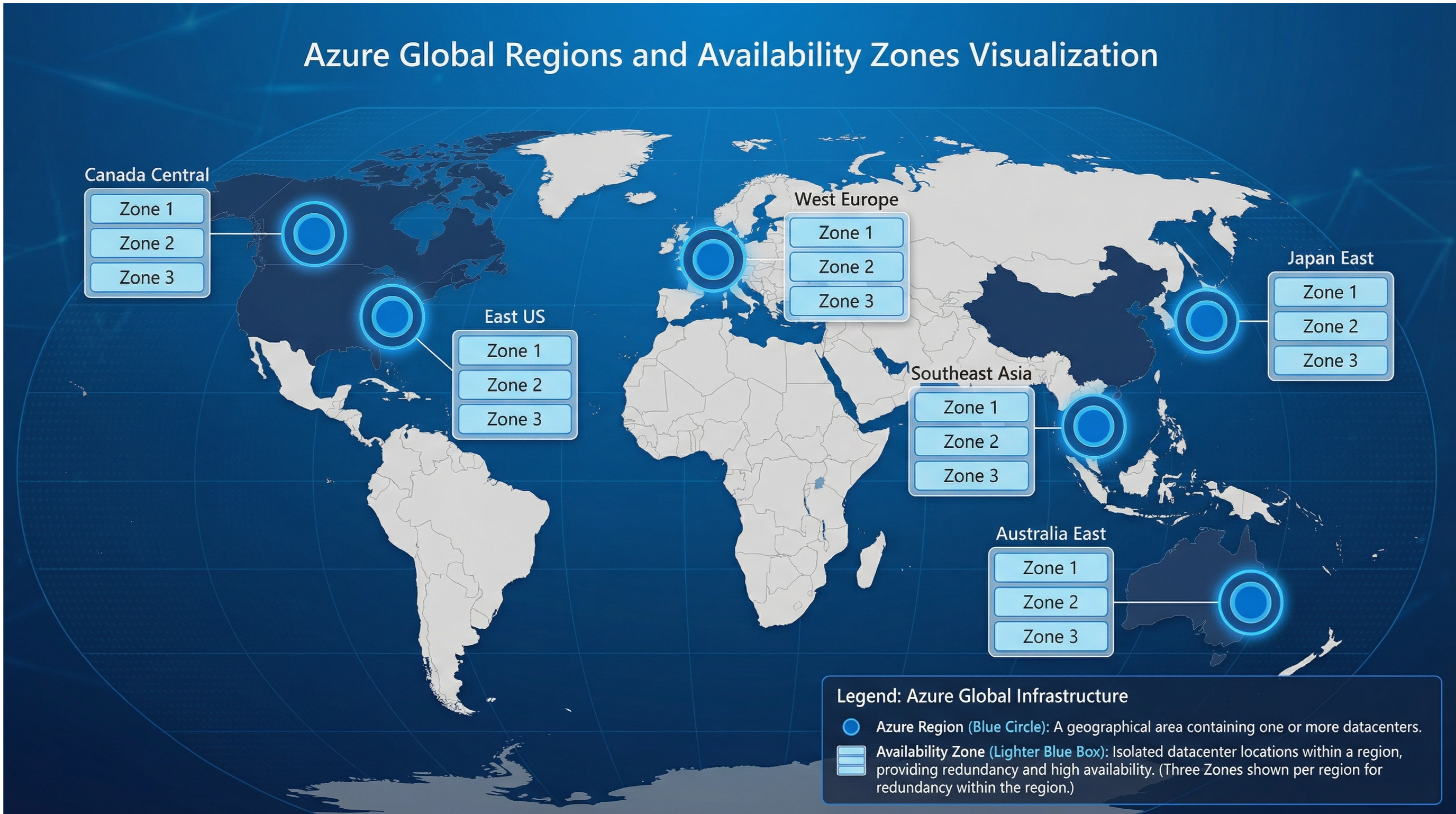
Azure has data centers in 60+ regions worldwide. When you create a resource, you specify which region it runs in.
Why Regions Matter
- Latency — Users in Europe should use European regions
- Compliance — Some regulations require data to stay in specific regions (GDPR, HIPAA)
- Availability — Distribute across regions for disaster recovery
- Cost — Some regions are more expensive than others
Availability Zones
Within each region, Azure provides availability zones—isolated data centers with independent power, cooling, and networking. If one zone fails, your application continues running in another zone.
| Region | Availability Zones | Use Case |
|---|---|---|
| East US | 3 zones | Primary US region, lowest latency for eastern US |
| West Europe | 3 zones | Primary European region, GDPR compliance |
| Southeast Asia | 3 zones | Asia-Pacific coverage, data residency |
| Canada Central | 3 zones | Canada-specific compliance requirements |
| Japan East | 3 zones | Japan market, low latency for Asia |
# List available regionsaz account list-locations --output table
# Check which regions support availability zonesaz vm list-skus --location eastus --output table | grep -i zone
Azure Resource Manager (ARM) & Bicep
The Azure Resource Manager is the deployment and management service for Azure. It provides a consistent management layer for all Azure services, enabling Infrastructure as Code through ARM templates or Bicep. ARM templates are JSON files that define your infrastructure, while Bicep is a more readable domain-specific language that compiles to ARM templates.
Bicep Example
param location string = 'eastus'param environment string = 'prod'
resource storageAccount 'Microsoft.Storage/storageAccounts@2021-02-01' = {  name: 'cvaultstorage${environment}'  location: location  sku: {    name: 'Standard_LRS'  }  kind: 'StorageV2'  properties: {    accessTier: 'Hot'  }}
resource appServicePlan 'Microsoft.Web/serverfarms@2021-01-15' = {  name: 'plan-cloudvault-${environment}'  location: location  sku: {    name: 'B2'    capacity: 2  }  kind: 'linux'}
output storageAccountId string = storageAccount.idoutput appServicePlanId string = appServicePlan.id
Deploy it:
az deployment group create \ --resource-group rg-cloudvault-prod \ --template-file main.bicep \ --parameters environment=prodAWS to Azure Service Mapping
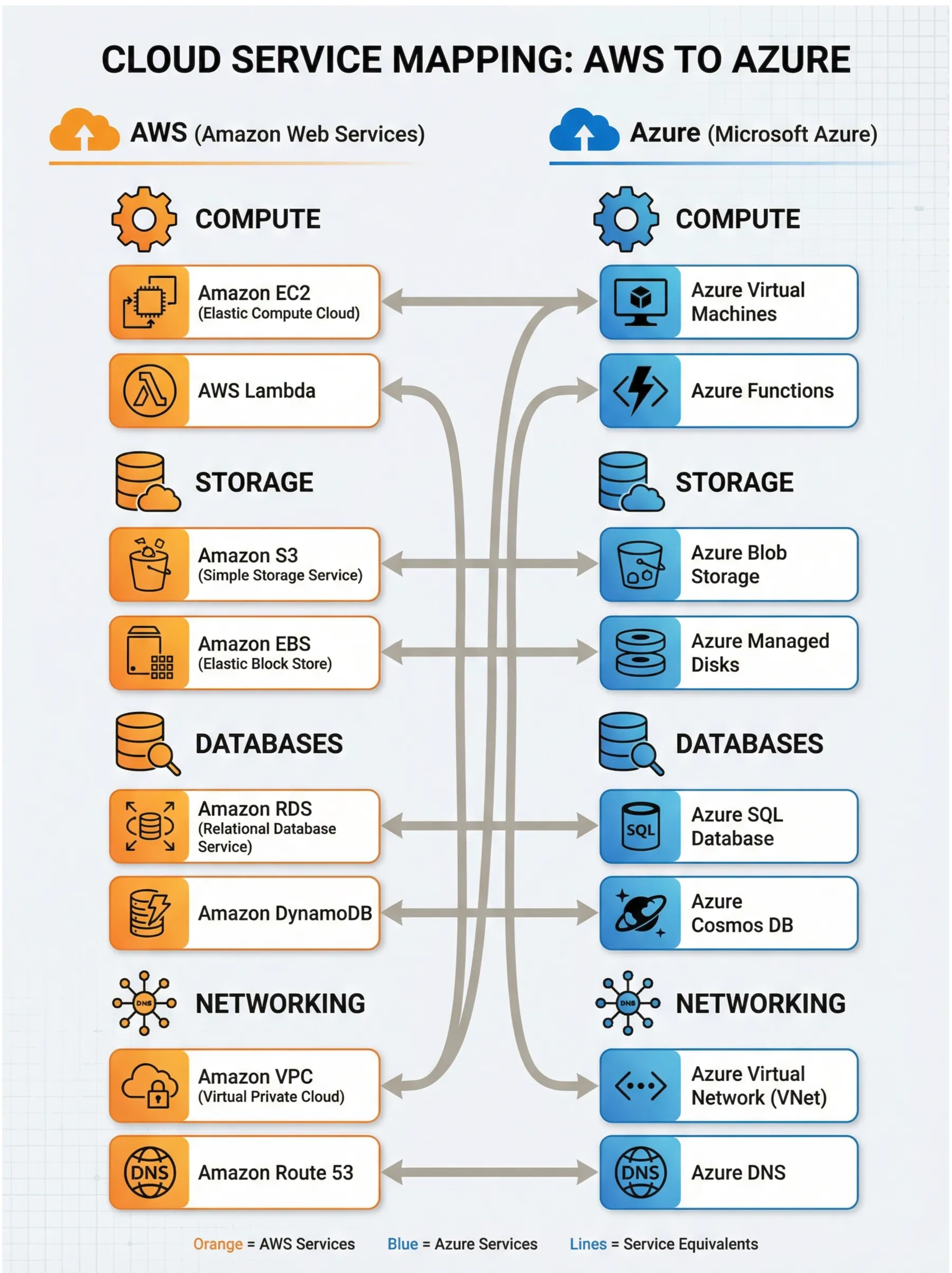
Understanding the terminology differences between AWS and Azure is crucial for transitioning your knowledge.
Detailed Comparison Table
| Concept | AWS | Azure |
|---|---|---|
| Account/Billing | AWS Account | Subscription |
| Resource Container | N/A | Resource Group |
| Virtual Server | EC2 Instance | Virtual Machine |
| Serverless Compute | Lambda | Azure Functions |
| Container Orchestration | ECS/EKS | AKS (Azure Kubernetes Service) |
| Object Storage | S3 | Blob Storage |
| Block Storage | EBS | Managed Disks |
| Relational Database | RDS | SQL Database |
| NoSQL Database | DynamoDB | Cosmos DB |
| Virtual Network | VPC | Virtual Network (VNet) |
| DNS Service | Route 53 | Azure DNS |
| Load Balancing | ELB/ALB | Azure Load Balancer/Application Gateway |
| CDN | CloudFront | Azure CDN |
| Monitoring | CloudWatch | Azure Monitor |
| Secrets Management | Secrets Manager | Key Vault |
| Identity & Access | IAM | Azure AD + RBAC |
| Infrastructure as Code | CloudFormation | ARM Templates / Bicep |
Cost Management
Azure charges for resources you use. Understanding costs is critical for production systems.
Cost Factors
- Compute — VMs, App Service instances (hourly)
- Storage — GB per month
- Data transfer — Egress charges (ingress is free)
- Services — Each service has its own pricing model
- Reserved instances — Commit to 1 or 3 years for discounts
Cost Optimization Strategies
# Check current spendingaz costmanagement query \  --timeframe MonthToDate \  --type Usage
# Set up budget alertsaz costmanagement budget create \  --name "Monthly Budget" \  --amount 1000 \  --time-grain Monthly
Best Practices:
- Right-size resources — Don’t over-provision
- Use reserved instances — Save 30-70% with 1-3 year commitments
- Delete unused resources — They still cost money
- Monitor spending — Use Azure Cost Management
- Use spot instances — For non-critical workloads (up to 90% discount)
Key Takeaways
- Subscriptions are billing boundaries; resource groups are logical containers
- Regions matter for latency, compliance, and cost
- Availability zones provide redundancy within a region
- Bicep enables Infrastructure as Code
- Cost management is critical—estimate before you build
- ARM is the deployment engine for all Azure services
What’s Next?
Marcus understands the fundamentals. Now he needs to deploy CloudVault’s API. In the next chapter, we’ll explore Azure’s compute services and build a production-ready Spring Boot application.
The summit awaits.
This is Part 1 of a 6-part series: “The Azure Ascent: A Backend Engineer’s Journey to Cloud Mastery.”